
Personalised Real-time Bid Floor Optimisation
The real-time bid floor optimisation system provides you with the perfect floor price, for every user, for every ad opportunity. It builds complex AI models that take into account the user profile, the current bidding landscape, and reinforcement learning with the history of filled requests throughout the session, along with a myriad of other features, to secure the best possible revenue for each individual impression.
It does this by analysing your revenue landscape and calculating predicted LTV and optimal market prices that are optimally positioned within that landscape. It then recommends the best price to use, in real time, for every individual user, before every ad request.
Standard Mediation Integration
In a standard ad mediation provider integration (MAX, LevelPlay, …) requests are made to your ad provider, with a static ad unit id, and a retry delay, until fill occurs:
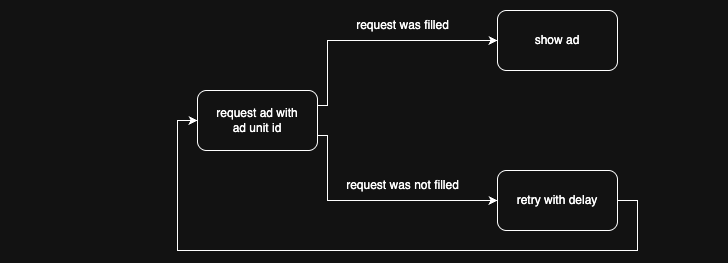
If your request for an ad was filled, you may show the ad. If not, you may request another ad, after a short delay.
Nefta's Intelligent Bid Floors
Nefta’s system sets the ideal floor price tailored for each individual impression by analysing user profiles, current bidding landscapes, historical ad fills, and numerous other factors. This results in a personalised, real-time bid floor that maximises revenue for every impression.
How it works
Integration is simple and straightforward by setting dynamic bid floors programmatically with customer parameters, eliminating the need to maintain multiple ad units with different floor prices.
The key benefits of this method are:
- Simplified Setup: Manage fewer ad units and streamline your waterfall.
- Real-Time Optimisation: Adjust floors instantly based on live ad performance to maximise uplift.
- Granular Control: Gain precise impression-level control over ad pricing.
Optimisation & Backfill
To complete the setup for maximum perfomance we recommend the following tripple track optimisation solution:
Three ad units working together:
- Two optimised ad units: Uses direct prices to optimise revenue in two dedicated ad units.
- Third ad unit: Ready to kick with backfill when required. A dedicated backfill ad unit with B2B caching and internal retries enabled.
Finalising the integration
Our algorithm optimises every retry, of every ad opportunity, in order to maximise revenue. This is done through reinforcement learning from filled and non-filled requests, as well as impressions:
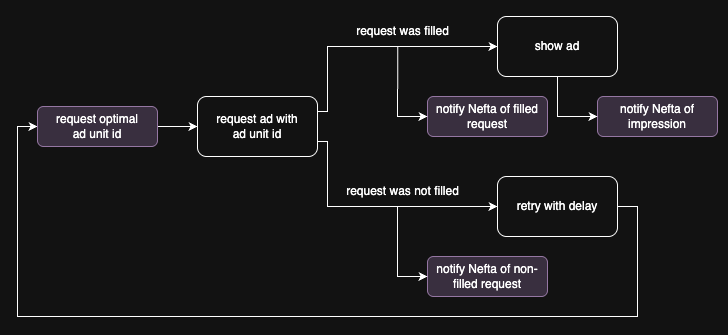
As you can see, in your integration, you must trigger events on filled requests, non-filled requests and impressions.
Integration
Step 1: Account and App Setup
Create your account and setup your app here.
Step 2: SDK Installation
Install the SDK based on your platform iOS, Android or Unity.
Step 3: Nefta Initialisation Flow
Please review the SDK initialisation flow as it directly impacts A/B testing and data parity.
Step 4: Integration Testing & Verification.
Please review the documentation for testing and verification here. Please inform Nefta when testing is complete as the integration is additionally checked on our side.
Step 5: Release
Once both parties are satisfied with the integration, test mode will be disabled and your new app version may be released. Initially your app will not be served recommendations. During this time models are built and your revenue landscape is analyzed and optimal floor price positions are determined. Once those are trained, magic begins.
Step 6: A/B Testing and Uplift
A/B tests, determining performance and uplift, can be run by the publisher and/or Nefta. Please review the revenue uplift methodology here.
Updated 27 days ago