
Nefta A/B Test & Data Setup
Core Architecture & The Initialization Flow
- The publisher initializes the Nefta SDK by providing an
OptimizationTypeenum (Optimized,NotOptimized, orUnknown). - Nefta's SDK initializes asynchronously and returns an
InitConfigurationobject containing_isSessionOptimized(boolean) and the user's Nefta Unique ID (_nuid). - The host application uses
config._isSessionOptimizedwithin the callback to configure ad mediation (such as disabling fixed back-to-back ad units in AppLovin MAX) and to route the user to either default or optimized ad display logic.
Depending on your experimentation infrastructure and data governance requirements, Nefta supports three integration models:
- Option 1: Shared A/B Test (Publisher-Managed Split & Full Data Parity)
- Option 2: Nefta-Managed Optimization (No Publisher A/B Test)
- Option 3: Isolated A/B Test (Not initializing for 100% of users)
Option 1: Shared A/B Test (Publisher-Driven Split)
Non-Technical Perspective
- Ideal For: Publishers who already run their own remote configuration or experimentation platform (e.g., Firebase Remote Config, LaunchDarkly, Statsig) and want total control over cohort allocation (e.g., a 50/50 split or a staged rollout).
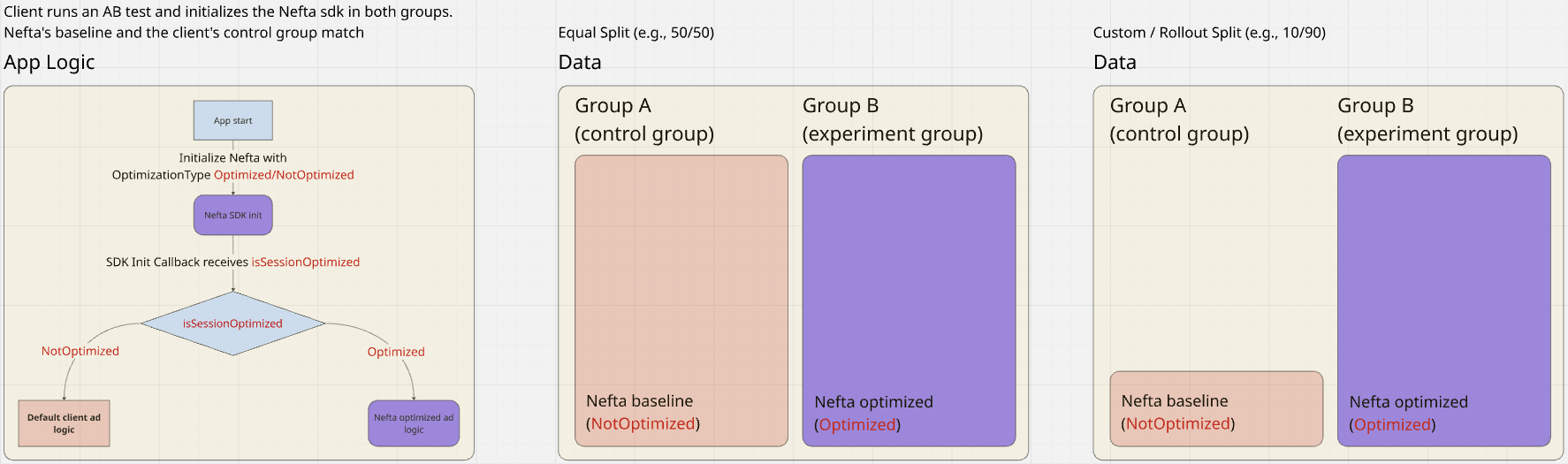
- Data Transparency: Complete data parity. Group A (Client Control) matches Nefta's Baseline, and Group B (Client Experiment) matches Nefta's Optimization group.
- Reporting Alignment: Uplift figures and revenue metrics align between the publisher's internal BI reports and Nefta's reporting dashboard.
Technical Perspective
The client app evaluates user bucket assignment prior to SDK initialization. The app then passes the appropriate enum into NeftaMediationAdapter.InitWithAppId(...). Nefta respects the client's decision and echoes the state back in the completion callback. Your BI team can log the _isSessionOptimized property and tag control/experimental events, see Custom BI Tagging in Option 2.
- Group A (Control): Initialized with
OptimizationType.NotOptimized - Group B (Experiment): Initialized with
OptimizationType.Optimized
Option 2: Nefta-Managed Optimization (No Publisher A/B Test)
Non-Technical Perspective
- Ideal For: Publishers who want seamless, turnkey optimization without building or maintaining an external A/B testing infrastructure.
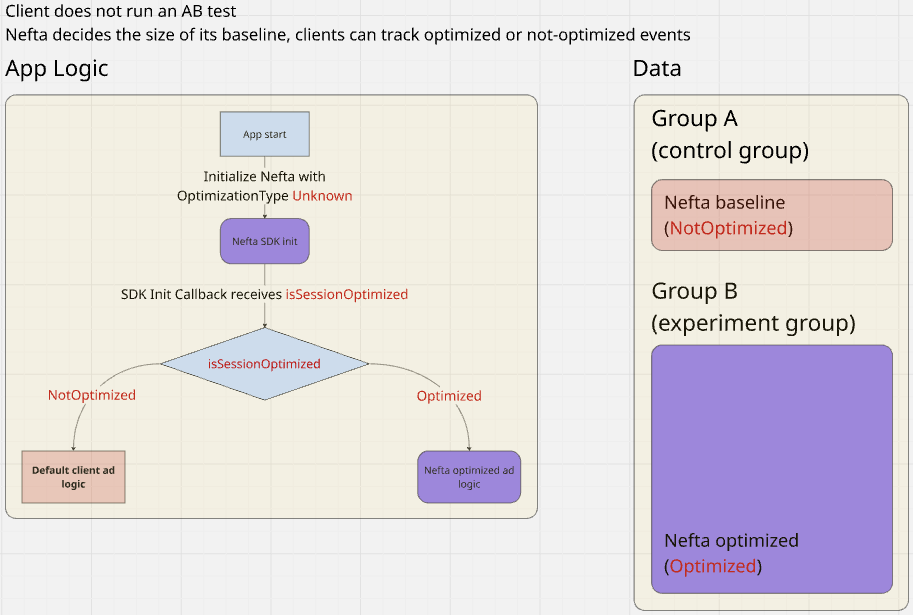
- Automated Holdout: Nefta automatically reserves a small holdout baseline (e.g., ~5% unoptimized) while optimizing the majority (~95%) of traffic. This baseline allows Nefta to continuously compute and demonstrate ongoing revenue uplift.
- Custom BI Tagging: While 100% of the audience is initialized with Nefta, your internal analytics are never a black box. Because Nefta communicates the optimization status on every app launch, your BI team can log this property directly into your own data warehouse (e.g., BigQuery, Mixpanel, Firebase Analytics). Internal baseline vs. optimized reporting matches Nefta's dashboard figures.
Technical & Engineering Perspective
The publisher passes OptimizationType.Unknown during initialization. Nefta's backend determines whether the session belongs to the optimization cohort or the baseline and returns the resolution in config._isSessionOptimized.
Graduating from Option 1 to Option 2
Publishers that start with an A/B test (Option 1) to validate Nefta's performance can easily graduate to full production rollout (Option 2). Simply deprecate the remote-config flag and pass OptimizationType.Unknown for all sessions. Nefta will take over baseline maintenance automatically.
Option 3: Isolated A/B Test (Not initializing for 100% of users)
Non-Technical Perspective
- Ideal For: When it is not possible or desirable to initialize Nefta's SDK in the entirety of the experiment's user base, and the SDK is only initialized within the designated test group.
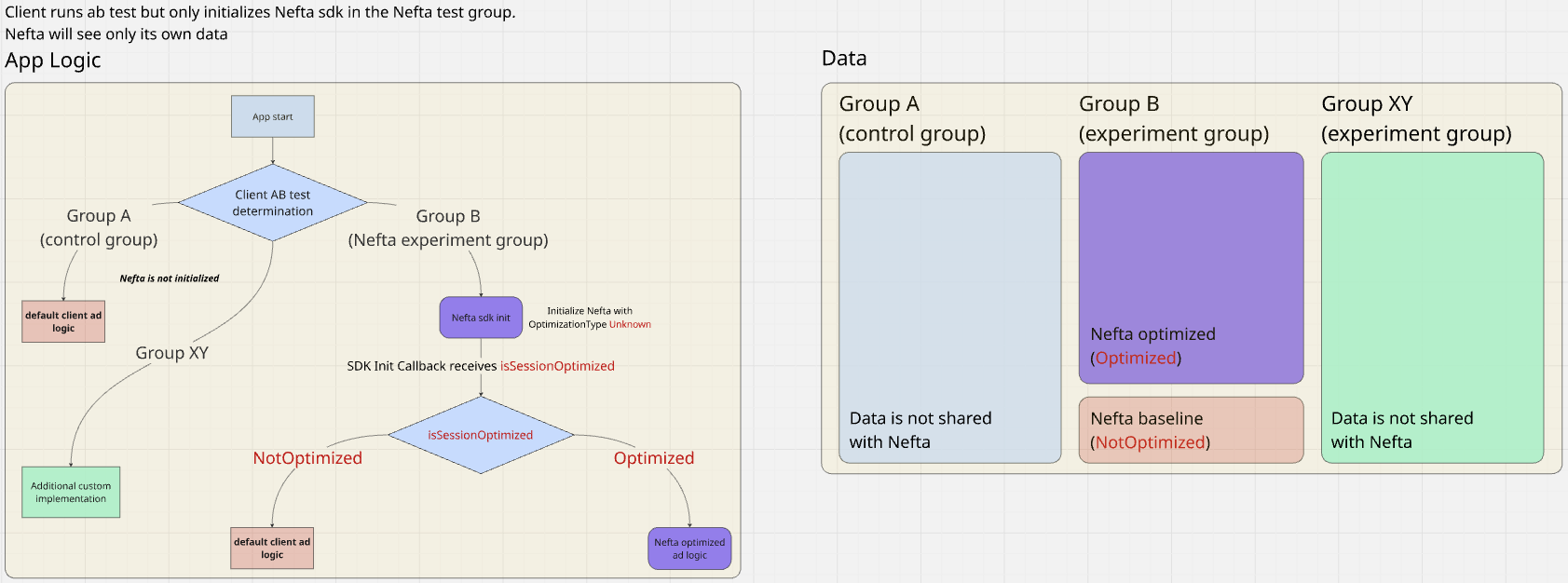
- Trade-off & Reporting Discrepancy: Nefta is completely blind to Group A (and any other external test groups). Because Nefta receives zero telemetry from Group A, Nefta must carve out its own internal baseline holdout inside Group B to evaluate its algorithms.
- Publisher's calculation: Uplift = (Group B Total / Group A Control) - 1
- Nefta's calculation: Uplift = (Nefta Optimized in B / Nefta Baseline in B) - 1
- Because Group B contains an internal unoptimized, the blended performance of Group B may appear slightly diluted compared to a purely optimized group, and reported percentages will not match between dashboards.
Technical Perspective
The client-side router assigns users into cohorts before any SDK calls:
- Group A (Control) & Group XY (Other): Do NOT initialize Nefta. Directly initialize ad mediation with default logic.
- Group B (Nefta Experiment): Initialize Nefta using
NeftaPlugin.OptimizationType.Unknown. Inside the callback, initialize ad mediation based onconfig._isSessionOptimized.
Updated 20 days ago